For those who organise the congregation
Who does what in the congregation, on a single page.
Teams, their leaders and everyone’s role are kept in the same place as everything else, and the organigram on the information board updates itself. Each brother has access to the tools of his responsibilities. When another brother takes over a role, he gets that access without redoing anything.
14-day free trial · no credit card required
What makes every change of responsibility harder.
The organigram lives in a spreadsheet
One version on the board, another on a brother’s computer. Nobody knows which one is right.
Every change is redone by hand
A new brother looks after the sound, and everything has to be redone: his access, the programmes he looks after, the board.
Access is given person by person
Sometimes too much access is given to go faster, sometimes not enough. After a while, nobody knows who can do what.
Roles and permissions
Access goes to a role, not to a person.
In Settings › Roles and permissions, you choose what each role allows, module by module. A brother has access to what his roles allow.
Some roles update from the records: elder, ministerial servant, pioneer, baptized publisher… You don’t have to look after them.
- 48 permissions, grouped by module
- Elder, pioneer, baptized…: these roles follow the records
- To give a brother access, you give him a role
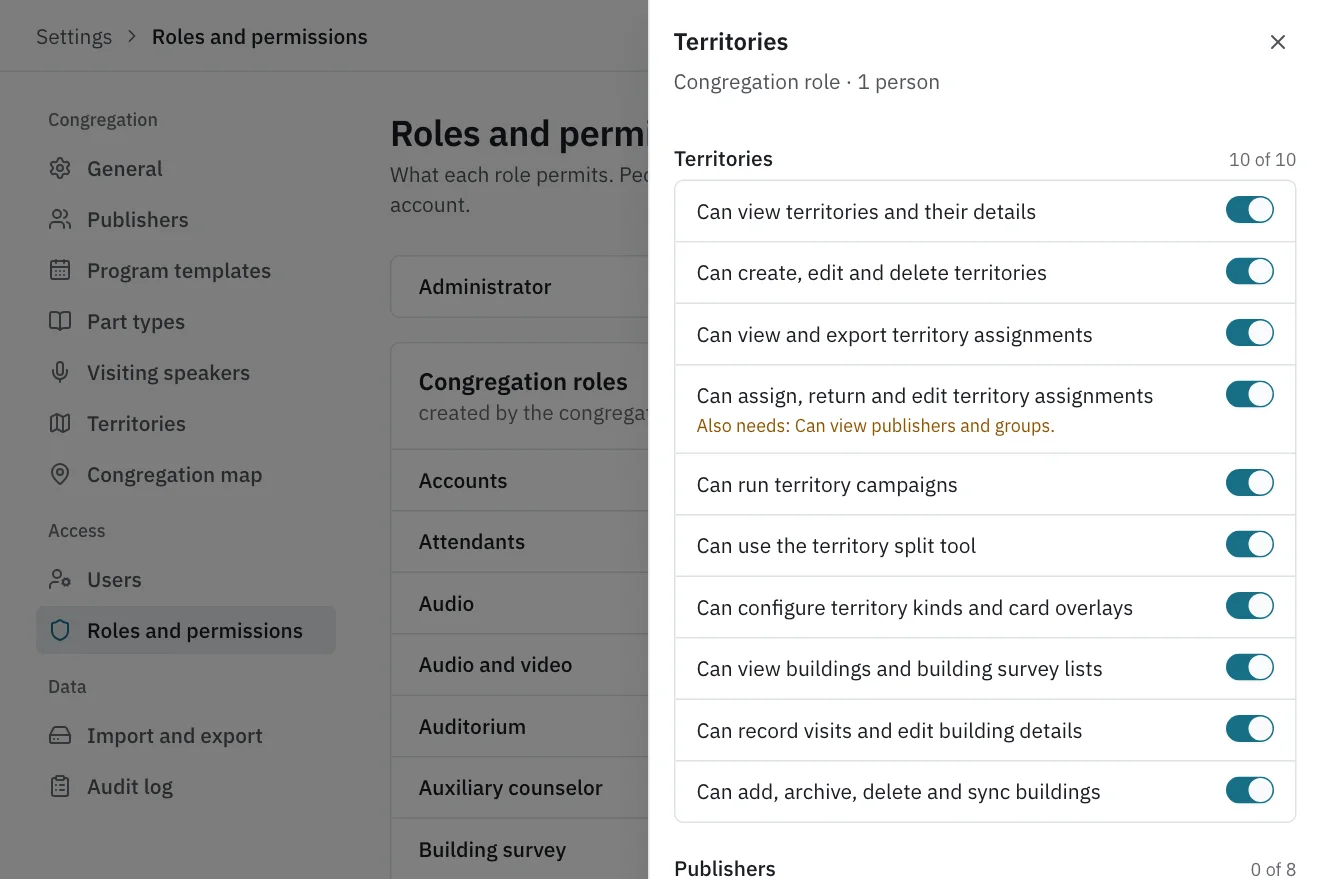
Everything the module ships with
- Create the congregation’s teams (sound, attendants, territories…) and name their leaders, deputies and members
- The elders and the ministerial servants appear in the organigram on their own, from their record
- You can name a brother who has no account: his name still appears in the organigram and on the board
- When another brother takes over a role, the role’s deputies don’t change
- The organigram shown on the board updates as soon as you change something
- You can entrust a meeting’s programme to a role: the brother who holds that role can prepare that programme without access to the others
- Unitae stops you from deleting a role that is still used elsewhere (a board section, a territory type, a part of the programme) and shows you where
The organigram
The whole congregation, from top to bottom.
Each box is a role. A team has leaders, deputies and members. Other roles are held by a single brother, like the secretary’s. You place each role under the one it reports to, and the same organigram prints on the information board.
- Service committeeTeam
- Coordinator of the body of eldersOne brother1 brother
- SecretaryOne brother1 brother
- Service overseerOne brother1 brother
- TerritoriesTeam1 leader · 1 deputy · 2 members
- LiteratureOne brother1 brother
At the top of the organigram, the list of elders and ministerial servants updates from the records.
When a brother changes responsibility
You name the new brother, and he has what he needs right away.
Programmes, board sections and territory types are entrusted to a role, not to one brother in particular. When another brother takes over the role, you only change the name in the organigram: he gets the role’s access, programmes and sections. There is nothing else to change.
- AccessEverything the role allows, from the day he is named
- ProgrammesThe meeting’s programme entrusted to the role, or only the duties (sound, attendants…)
- Information boardThe board sections reserved to the role
- TerritoriesThe territory types reserved to the role
The previous brother loses this access at the same moment.
Everyone sees what concerns him
A brother only has access to what his roles allow. Every change of role or access is written in the audit log.
The next change of responsibility will be simpler.
An organigram that’s up to date, and everyone has the right access.
14 days free. No credit card. No commitment.
14-day free trial · no credit card required