The letter you posted in WhatsApp is already buried.
Branch letters, schedules, announcements — all on one board, organised by section, visible from every phone, and never lost under tomorrow's messages.
Why important documents disappear.
WhatsApp buries everything by 6pm
A branch letter gets sent, fifteen replies follow, and by the evening it's three screens deep. The brother joining next month never sees it. The brother who asked you twice can't find it either.
Nobody knows who has read what
You hand a printed letter to one elder, send a PDF to two others, and wonder on Tuesday whether the message actually reached everyone.
Versions multiply silently
The schedule was updated on Wednesday. The version most members opened is the one from Monday. You can't tell, because the file looked the same in their inbox.
The shared inbox of the congregation deserves more than WhatsApp.
Upload the letter once. Every member sees it where they expect.
Open the board, drop the PDF into the right section, schedule when it appears and when it expires. Restrict it to elders if it's an elders' letter. Pin it to the featured section if it matters this week.
Every member sees it the next time they open Unitae, with an 'unread' badge. The system tracks who has opened it, so you can answer 'did everyone see this?' with a yes — not a hope.
- Sections, visibility scheduling, and per-section role restrictions
- Per-member read tracking with New / Unread / Updated badges
- Version history on every document — replace a PDF and the previous version stays browsable
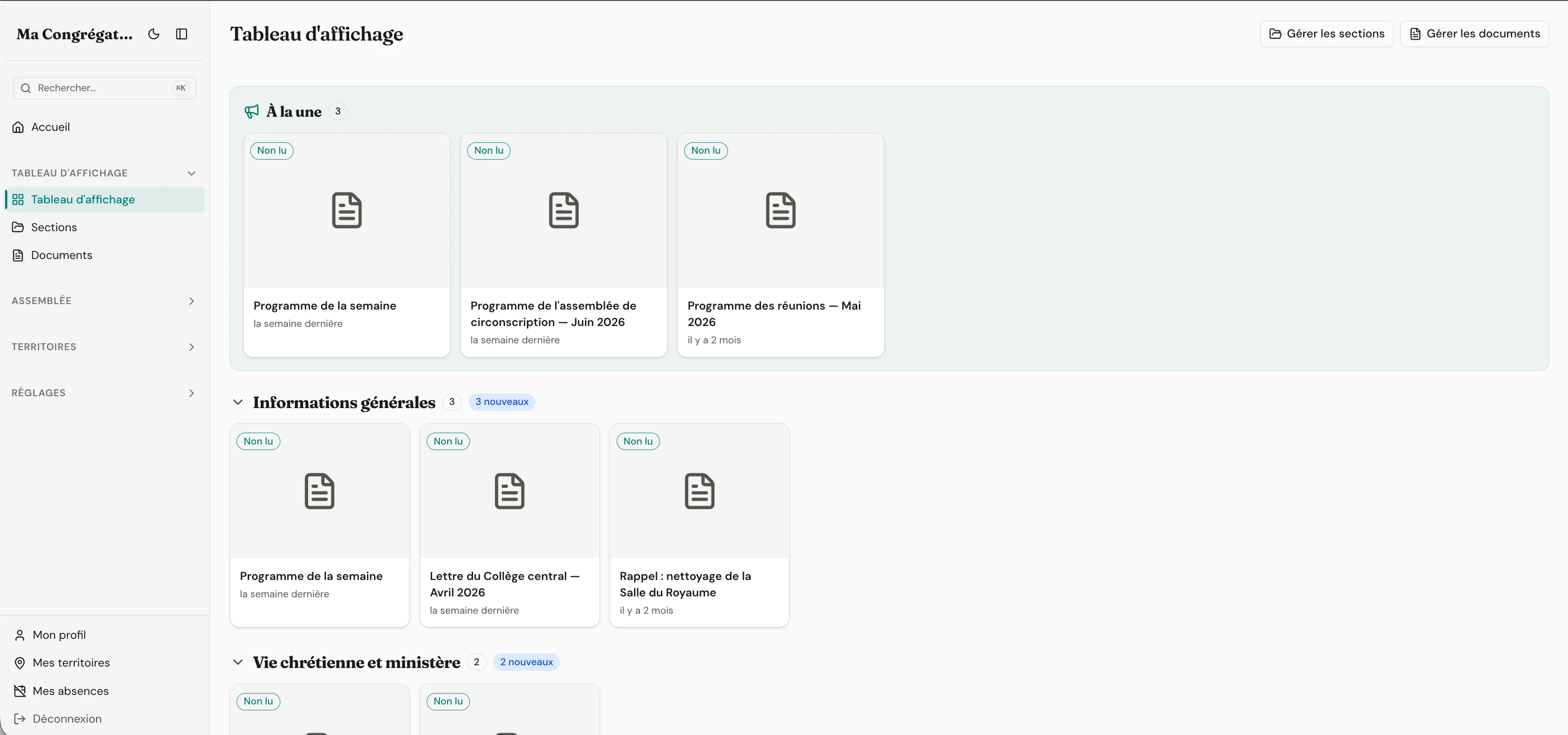
Everything the module ships with
- PDF documents organised by collapsible, reorderable sections with document counters
- Section visibility by role — restrict elders’ letters to elders, or keep a “Service committee” section visible to that role only
- Visibility scheduling (start and end dates) plus highlighting for featured documents
- New / Unread / Updated badges and per-member read tracking — know who has viewed each document
- Version history on every document; dynamic documents (publisher groups, pioneer list, live programmes) re-flag themselves unread when the underlying data changes
- In-app PDF viewer that works on desktop, iOS, and Android — no download needed; uploader and validator roles separate writing from approval
Role-gated sections
Elders’ letters stay with elders.
Each section on the board can be restricted to specific roles — built-in roles (Elder, Anointed, Pioneer, Brother, Sister) or the custom roles you’ve defined in Settings. Members who don’t hold those roles see neither the section nor its documents. The board feels personal because it is.
Sections, with the roles allowed to see them
- Branch lettersElders only
- Service committeeService committee
- AnnouncementsEveryone
- Pioneer lettersPioneers
Dynamic documents
Documents that update themselves.
Beyond PDFs, the board can host live data — the field service groups roster, the current pioneer list, an upcoming-events programme. These dynamic documents reflect current data, and re-flag themselves “unread” when the underlying data changes. Members notice when a new pioneer joins their group or when a programme assignment shifts.
- Field service groups, pioneer list, and programmes available as live documents
- Auto-unread when the underlying data changes
- Preview summaries on each card so freshness is visible at a glance
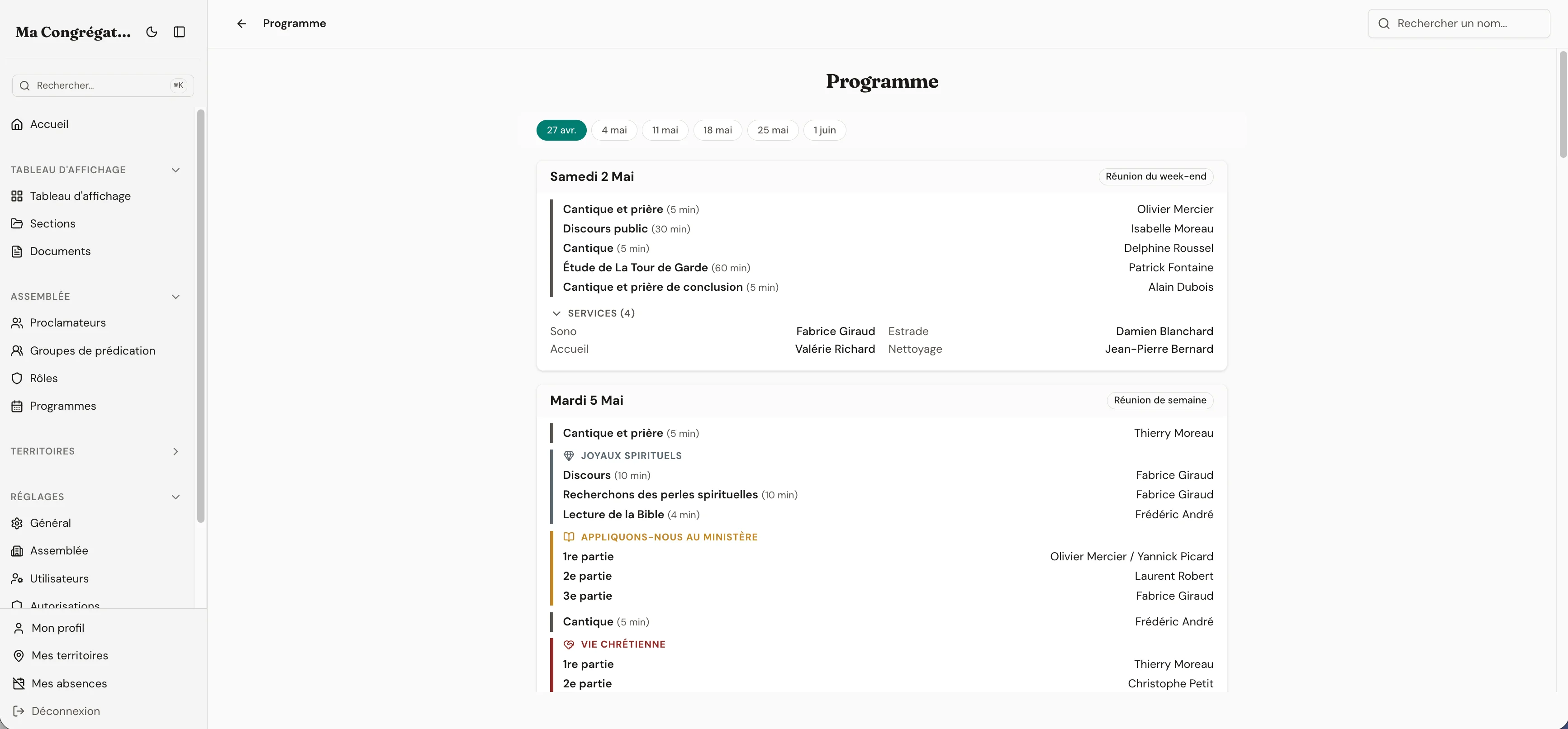
The board re-flags this dynamic document whenever a programme assignment is published or changed.
Version history
Replace a PDF. Keep the old one a click away.
Every upload is recorded with the date and the uploader. When you replace a PDF — corrected schedule, new translation — the previous version stays browsable from the history (clock icon) and you can restore one if needed. The schedule from last week is still findable when someone asks. Permissions follow the original uploader: the brother who uploaded a document can replace it; only Validators can replace anyone’s.
- v3Current
2 days ago · Bob (you)
- v2Restore →
5 days ago · Alice
- v1Restore →
2 weeks ago · Bob
Role-gated section visibility
Each section can be restricted to specific roles — built-in (Elder, Anointed, Brother, Sister, Pioneer) or custom ones you define. Members who don't hold those roles see neither the section nor its documents. Elders' letters stay with elders. The Service committee section stays with the Service committee.
How many letters are buried in WhatsApp right now?
Stop asking 'did you see the letter?' in the hallway.
14 days free. No credit card. No commitment.
14-day free trial · no credit card required