For Jehovah’s Witnesses · Open source
Done with Excel and Word. Your congregation, finally simple to run
Stop chasing monthly reports, recalculating the same figures, redrawing territory cards, and rebuilding your list of speakers every time it changes. Unitae brings together the data and tools to simplify your daily work for the congregation: territories, programmes, reports, visiting speakers, the information board. Enough to give back the equivalent of half a day a month to each brother involved.
14-day free trial · no credit card required · built by a ministerial servant, maintained with the help of contributors · used daily by several congregations in France and Ukraine
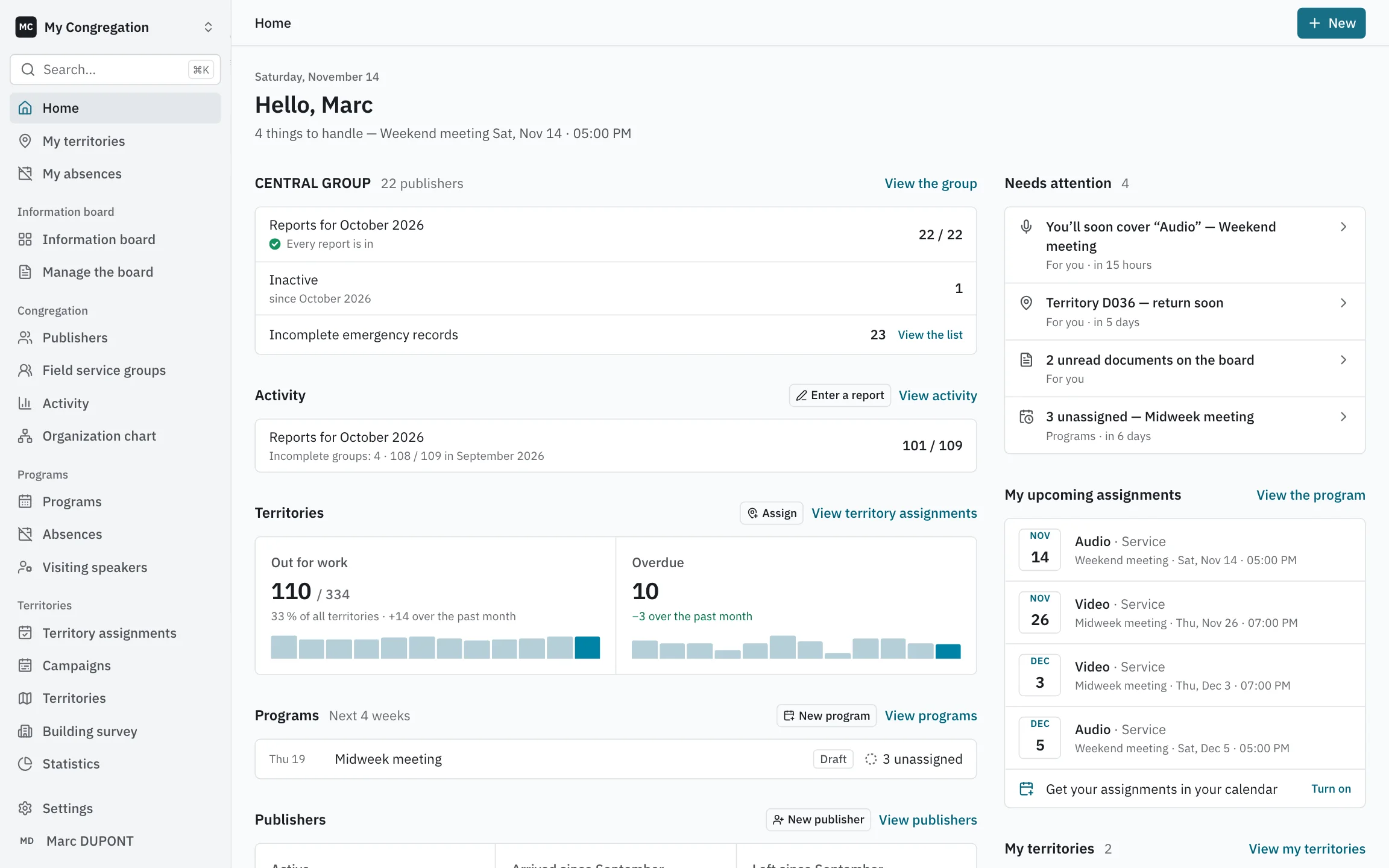
An appointed brother shouldn’t spend Sunday afternoon wrestling Excel.
Scattered tools
One Excel file for territories, another for reports, WhatsApp for announcements — and none of these tools talk to each other. Nothing is centralized: information gets lost and brothers waste time.
Territories that are hard to maintain
Addresses change, buildings evolve, maps become outdated. The territory servant spends hours redrawing cards that will soon be out of date again.
A puzzle with every programme
For every part: who can take it, who had it recently, who will be away that day. Dozens of checks for a single programme, and the whole meeting to lay out again in Word.
Five to ten hours saved a month. Every month.
Here is what changes when your congregation uses Unitae: the territory servant stops chasing addresses, programmes come together without the puzzle, and every member logs in to find what matters to them.
Compare Unitae with other tools →For the territory servant
All the territory work, none of the spreadsheet upkeep
Much more than simple attribution tracking. Unitae helps you create, maintain, and use your territories on a daily basis.
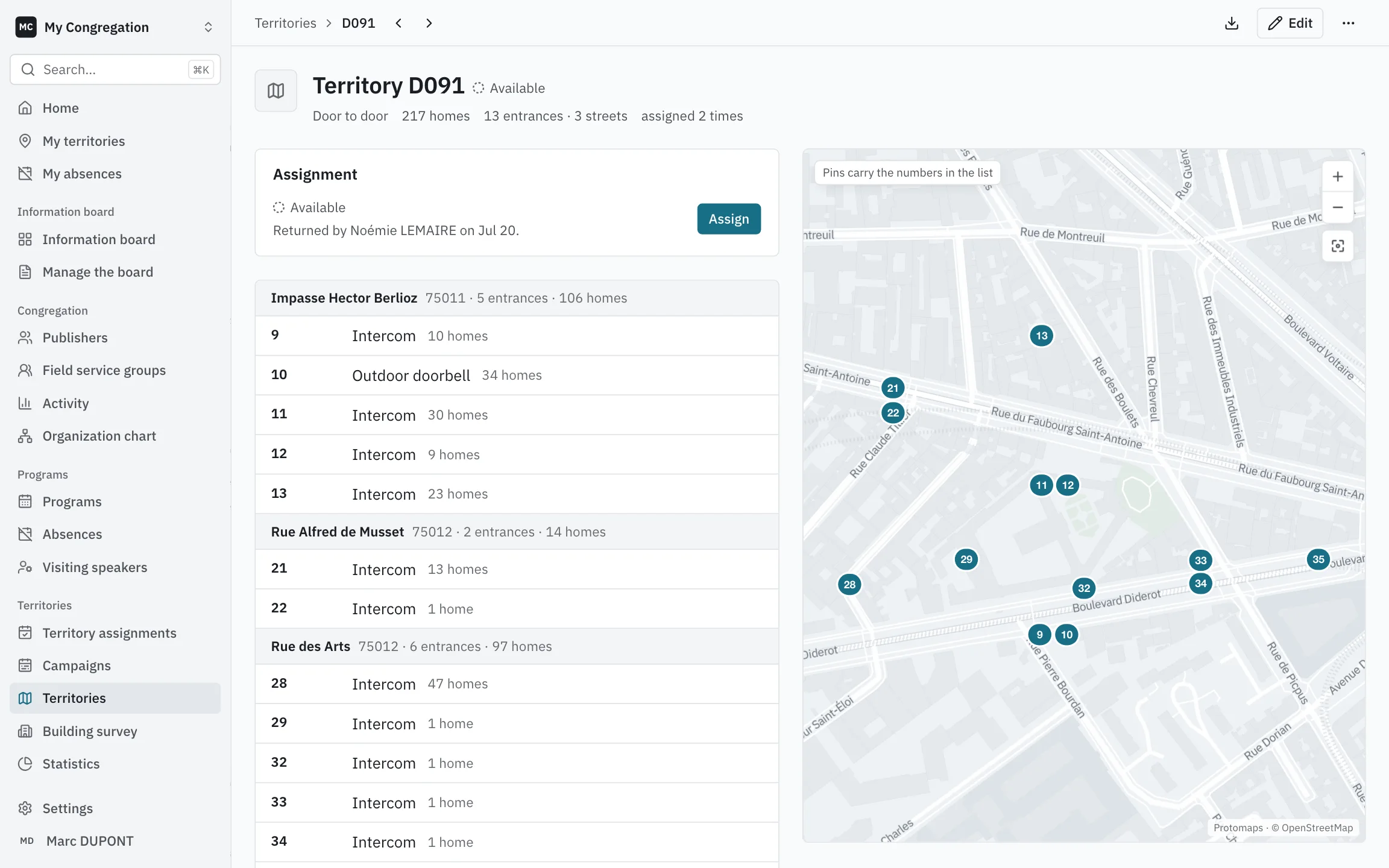
A living address database
A new building in your territory? Add it in seconds. In France, new addresses come from the national open address database (BANO), in one click.
- Door-to-door, universities, businesses, telephone, hotels and more
- Addresses update from open data — one click, and new buildings appear without anyone typing them
- Interactive maps, served by your own instance
Ready-to-use exports
Generate an S-13 in one click. Create territory cards as PDFs with embedded maps, ready to hand out.
- Hand a publisher a territory card in five seconds — map included
- S-13 report generated in one click, no manual compilation
- Export the S-13 to Excel or PDF whenever you need
Clear and visual tracking
See at a glance which territories are overdue, which are available, and how coverage is evolving.
- Attribution and overdue tracking
- Statistics by theocratic year (September–August)
- Overview for each territory
I’ve been in many congregations, but what you have for splitting and managing territories — I’ve never seen anything like it. A tool that uses real building data to enrich territories is brilliant. It’s truly the first time I’ve seen that.
For the programme coordinator
No more calling five brothers to find out who’s available Thursday
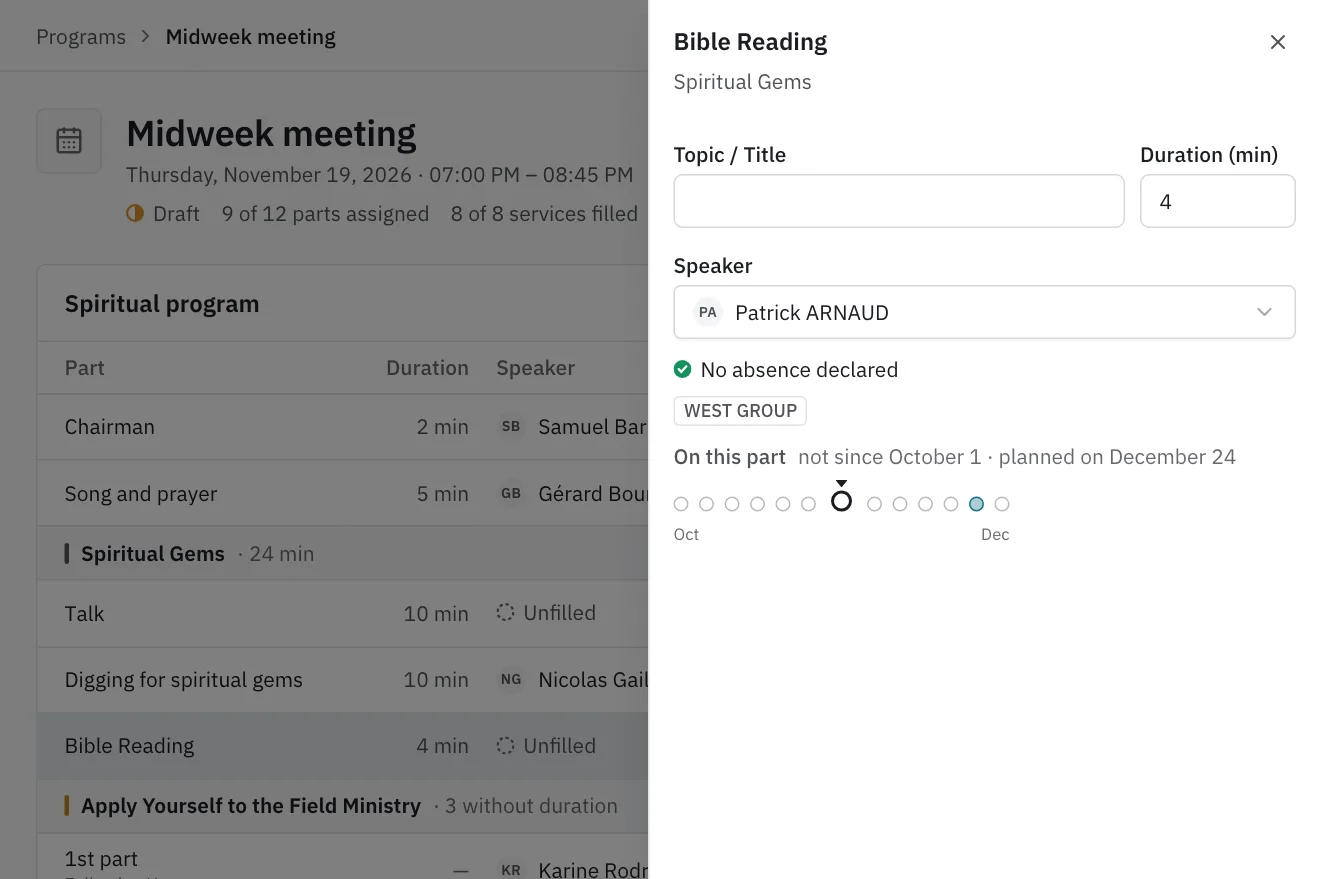
Define your meeting structures, assign speakers, detect conflicts — and export polished PDFs ready to print.
- Recurring and one-off programme templates
- Parallel parts for simultaneous rooms or groups
- Rotation history at a glance — a warning when the same name comes back too often
- Automatic conflict detection with days off
- PDF export filtered by template and date range
- Delegate a template’s management to a role
One tool. Every responsibility managed.
The territory servant sees overdue cards. The secretary sees missing reports. A publisher sees their next assignment. Everyone in the same tool, each with their own view.
Publishers and reports
Every month, reports are in — hours, studies, pioneer service. Pioneer progress and emergency-preparedness details live on the same profiles, and the annual summary exports in one click.
Information board
Branch letters, schedules, announcements: your documents are organized by section and displayed at the right time.
Your dashboard
Each member sees what matters to them: assigned territories, upcoming assignments, latest documents, and reported absences.
Pricing
Same features. You choose who manages the server.
Same features, same open-source code. The only difference: who manages the server.
When you subscribe, you’re funding the next feature for every congregation using Unitae — including the ones running it for free. Larger congregations contribute a little more, so the price stays fair for everyone.
Deploy on your own server. Same code, same features.
- All features included
- Unlimited publishers
- Unlimited territories
- Unlimited storage
- Community updates
- GDPR ready
Best for congregations with a technically skilled member who wants full control.
Backups run every night. Certificates renew themselves. Updates ship while you sleep. You open a browser and your congregation is there.
- Ready in 30 seconds — no server needed
- Daily backups, we handle recovery
- Automatic updates — always the latest version
- Priority support by email
- Dedicated subdomain (your-congregation.unitae.app)
- Cancel anytime — export all your data, no lock-in
Your congregation’s data deserves better than a brother’s laptop.
A hard drive that fails, a stolen laptop, and everything is lost or exposed. With Unitae, your data is hosted in France, backed up automatically, and each person sees only what their role allows. Security and privacy aren’t optional extras.
No tracking in the app
No analytics, no ads, no tracking in the app. It only uses the cookies it needs to work: the session, the language, the sidebar.
GDPR compliant by design
Every feature is designed to comply with European data protection regulations.
Hosted in France
Your data is stored in France at OVH, in Strasbourg and Paris. No primary transfer outside the European Union.
Roles draw the right circle
Each member only sees what their role grants — a publisher sees their card, a group overseer sees their group, elders configure who sees what. Sensitive information stays inside the right circle.
Move in. Move out. Both directions.
The same code runs hosted and self-hosted, so your congregation can switch sides whenever — with every territory, publisher and document intact. No vendor lock-in: a real round trip, not a one-way escape hatch.
Isolation enforced by PostgreSQL
Each congregation’s data is enforced at the PostgreSQL level with Row-Level Security. A bug in the app is not enough to make one congregation’s data appear in another’s view: the database itself filters every request made for a congregation.
Roles you actually shape
Built-in roles (Elder, Pioneer, Anointed and more) come ready, and 48 fine-grained permissions let you build custom roles like ‘Sound team’ or ‘Attendants’. Each responsibility gets exactly the tools it needs — nothing more.
Two-factor authentication
Members can add TOTP two-factor authentication from any authenticator app — a six-digit code on top of the password, resettable by an administrator if a device is lost.
GDPR tools and an audit log, built in
Data export (Articles 15 & 20), user anonymisation (Article 17 — with a deletion ledger), consent management, and a comprehensive audit log of sensitive operations. Not bolted on — designed in from day one.
14-day free trial · no credit card required
Every line of code is open. On purpose.
If we hide the code, we ask you to trust us. If we make it public, anyone in your congregation with the know-how can check all of it. We chose the second one.
Auditable by anyone
A technically skilled brother in your congregation can read every line of code on GitHub, starting tonight. He can see exactly how passwords are hashed, how data is isolated between congregations, and what happens when someone deletes an account. There is nothing hidden.
View the source code on GitHub →Built for congregations, by the community
Found a bug? Want a feature? Unitae is open to contributions. Self-hosters, developers, translators — everyone can help make the tool better for all congregations.
Contribute on GitHub →100% open source
Deploy it yourself
Unitae is distributed under the AGPL-3.0 license. Install it on your own server in minutes with Docker Compose.
- Open and auditable source code
- No locked features
- Your data stays with you
- Docker Compose to get started in 3 commands
$ git clone https://github.com/Unitae/unitae
$ cp .env.example .env
$ docker compose up -d
Unitae is running on localhost:8080
Not technical? No problem — managed hosting starts from €4/month so you can get started without a server.
Questions we actually get asked
See all questions →Is the free trial really no-commitment?
Yes. For 14 days, you have access to all features without providing a credit card. At the end of the trial, you choose whether to continue or not.
Is my data secure?
Absolutely. Your data is hosted in France (OVH, Strasbourg and Paris), encrypted, and isolated from other congregations at the database level. Unitae is GDPR compliant by design.
What if we want to switch between hosted and self-hosted?
You can go either way, whenever you want. Hosted and self-hosted run the same code, so a full export from one side imports cleanly into the other — territories, publishers, documents, programmes, everything. No vendor lock-in: a real round trip, not a one-way escape hatch.
What is the difference between managed hosting and self-hosting?
The features are strictly identical. With managed hosting, we handle the server, backups, updates, and TLS certificate. Self-hosting requires a server with Docker.
How is the price calculated?
Managed hosting is priced by the size of your congregation, never by its features — every tier gives you access to everything. It’s €4/month up to 50 publishers, €8 up to 100, €12 up to 150, then €16 beyond. It reflects the real cost of hosting, shared fairly: a small congregation pays less, a large one contributes a little more. Self-hosting stays free and unlimited. Your tier is set when you subscribe and only changes at renewal.
Is the interface available in English?
Yes, the interface is available in English, French and Portuguese (Portugal). You can switch languages at any time from your account settings.
Who develops Unitae?
Unitae was built by a ministerial servant who serves as territory servant in his congregation in France. He got tired of managing territories in Excel. It’s developed by MindsersIT (Lyon) and the codebase is open source — anyone can contribute.
What happens if I cancel my subscription?
You can export all your data at any time. No lock-in. If you cancel, your data is deleted within 30 days, unless legally required to retain it.
Can I manage meeting programmes and speaker assignments?
Yes. You can define recurring programme templates, assign speakers and service roles, detect conflicts with members' days off, and export polished PDFs. Each template can even be handed to a role: the elders, or one you create.
Your next month-end. No chase this time.
Get your Sunday afternoons back.
14 days free · No credit card · No commitment