For the group overseer
Every member of your group, within reach.
Everyone’s contact details, their emergency information, the date of your last visit: everything you need to take care of your group fits on one page. And the month’s reports are noted in the same place, with nothing to copy out.
14-day free trial · no credit card required
What takes the time you’d rather give your group.
Contact details are everywhere
A number in your phone, an address on an old piece of paper, an email in a conversation. To reach someone, you first have to find them.
Emergency information goes stale
Phone numbers change, a card is no longer up to date. The group’s list is rarely current on the day it’s needed.
Reports take up the room
Copying the notebook out, reminding the whole group to reach two people: the time goes to figures rather than to people.
Your group’s page
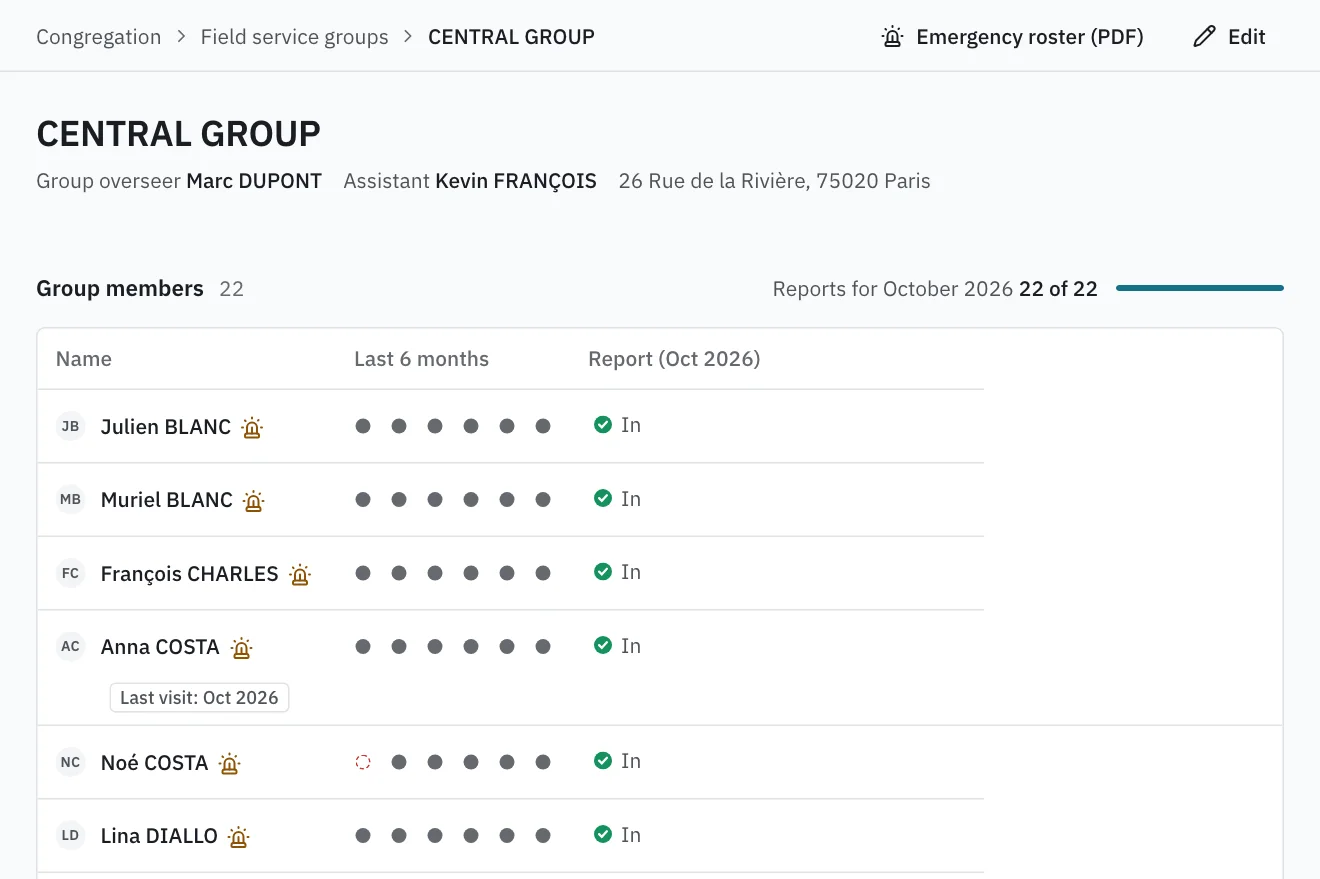
Open “My group”. Your whole group fits on one page.
Every member is within reach: their record opens to call them, text them or send an email. A siren flags missing emergency information, and you see at a glance who has handed in the month’s report.
You note the reports as the conversations come, from your phone, then move on to the next. A forgotten report can be caught up, a report already in can be corrected.
- Everyone’s contact details, to call or write to them
- Emergency information completed with no extra right
- The month’s reports, noted only once
Everything the module ships with
- The group’s members, with its overseer, its assistant and the address where it meets
- Each member’s record, to call them, text them or send an email
- The date of your last visit, and nothing else: no notes are kept
- The group’s emergency information completed in the same place, and the group’s roster as a PDF
- Inactive members stay in their group: nobody is forgotten
- The month’s reports noted from a phone or a computer, and corrected at any time
- The month’s goal under a pioneer’s hours, and a remark for the secretary attached to the report
- The groups document on the information board, with the address and a link to the map, updates itself
Emergency preparedness
The group’s list, up to date on the day it’s needed.
On the group’s page, a siren after a name shows what’s missing: an advance directive card, an emergency bag, a person to contact. You complete it with no extra right, and the group’s roster downloads as a PDF. Only the fact that a card is up to date is recorded, never what it says.
- Advance directiveCard up to date, at a glance
- Survival backpackGo-bag ready, or not yet
- Emergency contactsWho to reach, and how
With the secretary
What you note, the secretary already has.
Each report entered in the group counts at once in the congregation’s figures. The secretary has nothing to copy out: he sees the reports still expected, and exports the yearly summary and the S-21 records when he needs them.
- Publisher
Reports hours, Bible studies, and pioneer service to their group overseer — by message, in person, or however the group prefers.
- Group overseer
Reviews the group, fills in for anyone offline. Sees last month side by side with this month.
- Secretary
Watches the totals come in. Exports the summary in one click.
Each overseer sees his own group
The overseer and the assistant see their group, nothing more. Contact details and emergency information stay within that circle.
This month’s reports are a few days away.
More time for your group, less for the figures.
14 days free. No credit card. No commitment.
14-day free trial · no credit card required