Unitae and NW Scheduler
Looking for an NW Scheduler alternative?
Unitae opens in the browser, on any device. Programmes live in the same place as the rest of the congregation’s work, and every brother finds his assignments on his phone. Nothing to install, and everyone works on the same data.
Side by side
NW Scheduler is a widespread, complete program: meeting programmes, duties, territories, the secretary’s reports, and an app for publishers. It’s the reference many congregations reach for.
- It fills the midweek meeting from the workbook, and can suggest the students on its own
- It prints student assignment slips and sends them by email
- It comes in over 100 languages and imports data from many other tools
- It has an established community and plenty of help guides
- Nothing to install: Unitae opens in the browser, on a computer, a tablet or a phone. NW Scheduler’s desktop version installs on Windows; on a Mac, it only runs through an emulator.
- The data lives on a server, not on one brother’s computer: hosted in France and backed up every night, or on your own server.
- Every member has his own account: his assignments, his absences, his calendar, the board’s documents.
- The code is 100% open source (AGPL-3.0): a brother who knows the field can check everything.
If NW Scheduler suits you and preparing the workbook is what matters most, it remains a very good choice. Unitae is worth a look if you want the whole congregation working on the same data, from any device, with code you can check.
Compare Unitae with other tools →For every brother
Every brother has his assignments in front of him.
Once the programme is published, each brother gets an email for his assignment and finds it on his dashboard. If he subscribes his calendar, his assignments show up there on their own. He declares his absences himself: you see them when you assign.
- His assignments in Apple, Google or Outlook calendar, kept up to date
- An email when he gets an assignment, half an hour after you publish
- Need to remind him? Send him his assignment by SMS or WhatsApp from your phone
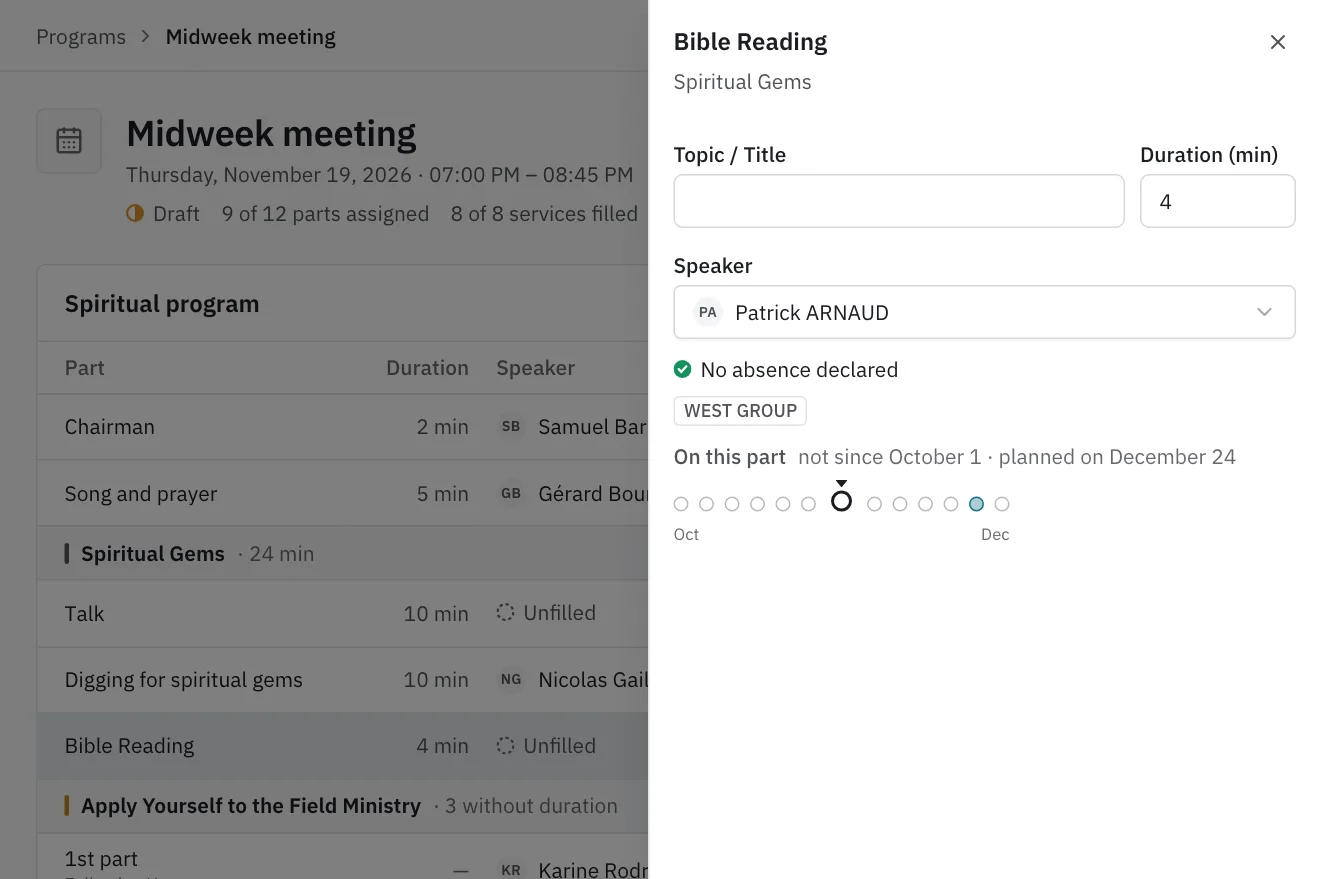
The moment of choice, fully informed.
Click a part of the programme. The brother’s rotation history, his availability and his load appear instantly.
The programme is already in place. All that’s left is to choose the brothers, and everything you need to know shows up beside it. You decide, not the software.
- An absence stops the programme from being published while the clash remains, and an absence declared later flags every meeting it touches
- The public talk kept for the elders, the reading for baptized publishers: each part of the programme goes to the right role
What you’ll find in the programmes module
- Prepare the programme as a draft: nobody sees it before you publish it
- Publish several weeks at once. The emails go out half an hour later, so you can still undo a mistake
- Regular meetings are already on the calendar two months ahead. You create their programmes several weeks at a time, after seeing exactly what will be created
- Visiting speakers kept by congregation. A congregation sends its new list? Drop in the PDF and Unitae shows you what changed
- Each meeting’s attendance, in the hall and online. The service-year averages add up on their own, the S-88 card comes out as a PDF and the figures in Excel
- Someone declares an absence on a day they have an assignment? Reassign the part of the programme straight from the absences page
Moving from NW Scheduler to Unitae
No need to switch everything at once. Start with the programmes; the rest will follow when the congregation is ready.
Start the trial (5 minutes)
Create your congregation’s space. No credit card. Your subdomain is ready immediately.
Add the brothers and sisters (30 to 60 minutes)
Enter the publishers with their roles: elder, ministerial servant, pioneer… That’s what decides who can take which part. For now, they are entered by hand.
Set up your meetings (an evening)
Check the midweek and weekend templates: days, times, parts, and who can take them. The meetings are then created two months ahead.
Run both tools for a few weeks
Prepare the next programmes in Unitae while NW Scheduler stays open beside it. When the published programme and the brothers’ calendars suit you, invite the congregation.
Your history doesn’t need to follow: keep NW Scheduler as an archive. The rotation history builds up again meeting after meeting.
Questions from NW Scheduler users
Does Unitae work on a Mac?
Yes. Unitae opens in the browser: Mac, Windows, Linux, Chromebook, tablet or phone. There’s nothing to install.
Can I import my data from NW Scheduler?
Not yet. For now, publishers are entered by hand, which takes 30 to 60 minutes. Keep NW Scheduler as an archive: the rotation history builds up again meeting after meeting.
Does Unitae fill the midweek meeting from the workbook?
Not yet: the parts of the programme come from your congregation’s templates. You adjust the week’s titles and durations before assigning.
Does the whole congregation have to switch at once?
No. Start with the programmes and run both tools for a few weeks. Territories, reports and the information board will follow when the congregation is ready.
How much does Unitae cost?
Self-hosting is free, with no limit. Managed hosting, in France, starts at €4 a month depending on the size of the congregation, with a 14-day free trial.
Where is the data stored?
On a server, not on one brother’s computer: in France and backed up every night with managed hosting, or on your own server. Each member only sees what his role allows.
Try Unitae on your next programmes
14 days free, no credit card. Prepare a week or two, and see what the brothers think.